MTS Converter on Mac, excellent MTS conversion software, can convert MTS files to other video and audio formats like AVI, MPEG, WMV, ASF, MP4, MOV, 3GP, VOB, FLV, WMA, MP3, AAC, etc. Mac MTS Converter provides powerful edit functions including cropping, trimming, merging the videos into one file, watermarking and setting subtitles as you want.
This article show how to use the Mac MTS Converter and what formats and devices are supported. But its powerful edit function of this converter is important for the users to edit the video. High technology and good hardware supported are also excellent features of MTS Video Converter on Mac OS x.
Download MTS Converter for Mac. Install this program on your Mac and then launch it.
Step One: Add files
Click  button to add MTS video files you want to convert.
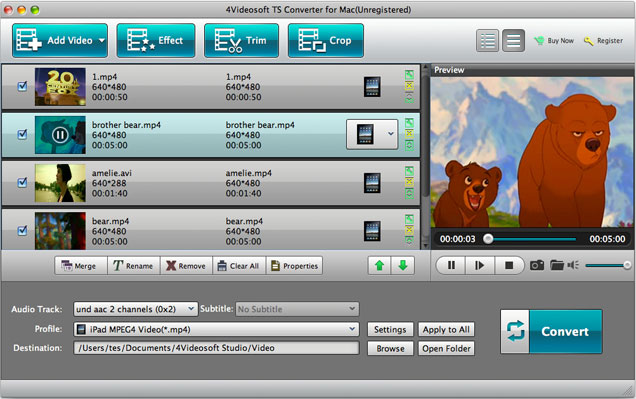
Step Two: Profile Settings
Click "Profile" drop-down button, choose category from the left of the drop-down list and then find the output format at the right of list.

Step Three: Set destination
You are allowed to change the default destination. Click "Browse" button and select one folder as the storage folder from the open window.

Step Four: Convert MTS files on Mac
Click  button to start to convert MTS video files on Mac
After the conversion is complete, click "Open Folder" button to find the converted MTS files.
This Mac MTS converter allows you to convert multiple MTS files with only one conversion. And you can choose to convert MTS video files to different formats or the same format.
| Supported Input File Formats | Video: MPG, MPEG-1, MPEG-2, MPEG-4, MJPEG, VOB, DAT, MP4, DivX, XviD, M4V, TS, MTS, M2TS, RM, RMVB, WMV, ASF, MKV, AVI, 3GP, 3G2, F4V, FLV, SWF, MPV, MOD, TOD, QT, MOV, DV, DIF, MJPG, TP, TRP, WebM Audio: MP3, MP2, AAC, AC3, WAV, WMA, M4A, RA, RAM, OGG, AU, AIF, AIFF, APE, FLAC, CUE HD Video: MTS, TS, M2TS, MPG, MPEG, MP4, WMV, QuickTime HD MOV |
| Supported Output File Formats | Video: MPG, MPEG-1, MPEG-2, MPEG-4, H.264, H.264/MPEG-4 AVC, DivX, XviD, AVI, FLV, MP4, M4V, MKV, MOV, 3GP, 3G2, MTV, SWF, WMV, ASF, DPG, TS, DV, VOB, AMV, WebM Audio: AAC, AC3, AIFF, AMR, AU, FLAC, M4A, MKA, MP2, MP3, OGG, WAV, WMA HD Video: H.264/MPEG-4 AVC, AVI, ASF, MKV, MOV, MPG, TS, WMV, MP4, WebM |

Privacy Policy
Copyright ® 2009-2013 TS Converter Download - Convert TS, MTS, M2TS to popular video/audio format. All rights reserved.